BLACK SOULS II
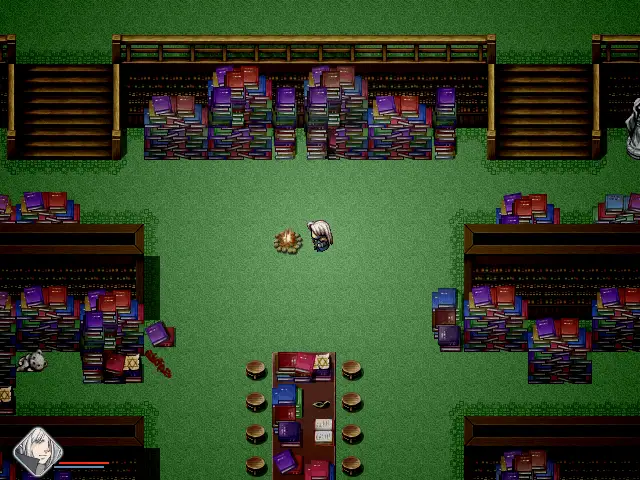
Sequel to the dark fairy tale RPG Maker VX Ace game, carrying its Alice in Wonderland retelling further into psychological horror, running on mkxp-z.
Port Details
Instructions
Copy Audio/, Graphics/, Fonts/, Movies/, Game.ini and Game.rgss3a from the Steam installation directly into the blacksouls2/ folder, alongside the engine.
Additional Information
Notes
Thanks to Eeny, meeny, miny, moe? for creating BLACK SOULS II, which takes the fairy tale cast of the first game somewhere considerably darker.
Playable. Boots, plays, fights, saves and loads on an RG40XX H, in English and with a Russian translation. Confirmed on KNULLI, on ROCKNIX with the Panfrost driver, and on muOS, dArkOS and AmberELEC by testers, the last two on an R36S, which is a different SoC entirely.
The game is paid, so only the engine ships here: mkxp-z, an open reimplementation of the RGSS runtime that RPG Maker VX Ace games run on. You supply the game's own files. The game renders at 640x480, so it is pixel for pixel on a 640x480 panel with no scaling.
Contents
Installing
You need: your own copy of BLACK SOULS II, a PC to prepare it on, and a handheld running PortMaster. Budget twenty minutes, nearly all of it copying files.
1. Install the port
Drop blacksouls2.zip into PortMaster's autoinstall folder and run PortMaster, which unpacks it and clears the folder.
Over ssh it is one command instead:
harbourmaster install <url of the zip>
Either way you end up with BLACK SOULS II.sh and a blacksouls2/ folder in ports/. The folder holds the engine and waits for the game.
2. Complete your copy of the game
Skip this step if you bought the game on DLsite, which ships it complete.
The Steam release is cut down: its Game.rgss3a declares 17 maps where the full release has 409. The publisher gives away an official patch that restores the rest, and it has to be applied to the Steam copy on your PC before the files are worth copying anywhere. Without it the port faithfully runs the reduced build, and nothing about that looks broken, which is the confusing part.
Note where the patch puts what it restores. If it updates Game.rgss3a itself, you are done here. If it instead leaves loose Data/, Graphics/ or Audio/ folders beside the archive, those belong in patches/ rather than next to the engine, for the reason in The patches folder.
3. Copy the game across
From your game folder, copy into ports/blacksouls2/, alongside the engine:
Audio/
Graphics/
Fonts/
Movies/
Game.ini
Game.rgss3a
Leave behind Game.exe, System/, ver.txt and the .vdf files. They are Windows or Steam only and the engine replaces them.
Some copies ship unpacked, with a Data/ folder in place of Game.rgss3a. Copy that folder instead; the port accepts either, and the Korean release is one of them.
The loose Graphics/ folder matters here. It holds the RTP artwork the game draws on, and only four of its files also exist inside Game.rgss3a. For those four the archive wins, which is what the game expects: the archived copies are its own and the loose ones are the stock defaults.
4. Play
Launch BLACK SOULS II from the Ports menu. First run unpacks the Ruby standard library, so it takes a few seconds longer than the ones after it.
Saves are written next to the engine as Save01.rvdata2 and upward. They survive reinstalling the port, as long as you keep that folder.
The patches folder
blacksouls2/patches/ is mounted above Game.rgss3a. A loose folder next to the engine is not: where the same file exists in both, the archive wins. So anything meant to replace the game's own content goes in patches/, and the folder is empty by default, which leaves the game exactly as shipped.
Two things usually go in it: the publisher's free patch for the reduced Steam build, and a translation that replaces only part of the game. Both arrive as a set of RPG Maker folders. Put their content folders directly inside patches/:
patches/
├── Data/
├── Graphics/
├── Audio/     (only if it ships one)
├── Movies/    (only if it ships one)
└── Fonts/     (only if it ships one)
Some archives wrap everything in a single top level folder, in which case copy that folder's contents rather than the folder itself. Leave out anything Windows specific: Game.exe, System/, *.dll, *.vdf, Game.rvproj2 and its own Game.ini are all unused here. Delete the folders again to go back.
A translation that ships the whole game instead, with its own Data, Graphics and Audio, is not an overlay. Put it in the port folder as the game and leave patches/ empty. Keeping both costs twice the space for nothing.
A save belongs to the script set that made it. Saves sit next to the engine and are never touched by what you put in patches/, but a save stores objects of the classes the game's scripts define, and will not load under a script set that is missing one of them. The reduced Steam build and the full build differ that way, and so can two translations. That is what bit here during testing: a save made against the full data would not load against the reduced Steam scripts, because it carried a Game_Map_Effects object those scripts have never heard of. The game stays quiet about it: DataManager.load_game swallows the error, so the load screen buzzes and sits there as though the button did nothing. Put the data back the way it was when the save was made and it loads. This is how the game behaves on Windows too.
compat.rb is loaded before the game and covers the two things such bundled RGSS scripts expect from the Windows runtime:
Win32API, called while loading by Steamworks achievement scripts and by the Fullscreen++ plugin. There is no Windows DLL to load on this platform, so those calls would kill the game before the title screen. They are made inert instead, and fullscreen is handled by mkxp.json anyway.
Graphics.resize_screen, which RGSS3 caps at 640x480 and silently clamps. A script asking for more therefore costs nothing on Windows, but mkxp-z honours the request and would render the game into an oversized buffer squeezed onto the panel. The cap is restored, so the game stays at 640x480 whatever a script asks for.
Controls
| Button | Action |
|---|---|
| D-Pad | Move, menu navigation |
| B | Confirm |
| A | Cancel, open menu |
| X | Dash |
| Start | Open menu |
Face button positions vary between handhelds, so Confirm and Cancel may sit the other way round on your device. The port does not remap anything: mkxp-z reads the pad through SDL_GameController, and the mapping comes from the firmware's own controller database.
Compile
The shipped mkxp-z.aarch64 is the aarch64 build from the PortMaster Last Scenario port. To build the engine from source instead:
- Build the bundled dependencies and Ruby.
git clone --recursive https://github.com/mkxp-z/mkxp-z.git
cd mkxp-z/linux
make -j$(nproc)
source vars.sh
-
Link against the system SDL2 rather than mkxp-z's own static fork. In
src/meson.buildforcedependency('SDL2', static: false), and inlinux/Makefiledropsdl2from thesdl2image,sdlsound,sdl2ttfanddeps-coreprerequisite lists. Verify withreadelf -d build/mkxp-z.aarch64 | grep NEEDED, which should listlibSDL2-2.0.so.0. -
Build the engine itself with the GLES backend.
cd ..
meson setup build -Dgfx_backend=gles -Denable-https=false --bindir=. --prefix=$PWD/build/local
cd build
ninja
ninja install
The Ruby standard library shipped as stdlib.tar.gz comes from linux/build-<arch>/lib/ruby/3.1.0.